
From a Global Leader in Password Forensics
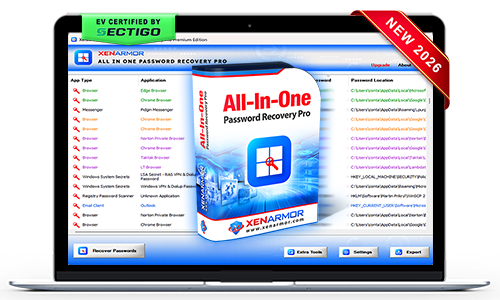
XenArmor All-In-One Password Recovery Pro
Recover forgotten passwords and secrets from 330+ popular Windows applications with one professional all-in-one toolkit.
- AI-Powered Recovery Engine: Instant recovery from 330+ Windows applications
- All-Type Password Recovery: Recover website, email, social, messenger, database, FTP, Wi-Fi, Windows vault/credential manager & system secrets
- Browser Secrets Recovery: Find login passwords, payment methods & autofill secrets
- Registry Passwords Recovery: Auto detect & decode passwords from Registry
- Custom Location Recovery: Extract credentials from custom profiles or external drives
- Command-line/Automation: Automate recovery & backup through CLI, scripts
- Forensics-Ready Workflow: Designed for forensic, IT teams, govt & enterprises
- EV Certified by SECTIGO: Verified for 100% tamper-proof & trusted by Antivirus



Trusted by Govt & Enterprises Worldwide

Tired of using multiple password tools with limited recovery?
Recover all credentials from 330+ applications with one unified, professional recovery toolkit.
- Reliable recovery engine backed by decades of security expertise
- One toolkit for website, email, Wi-Fi, FTP, database, messenger, and system passwords
- Industry-leading coverage with support for 330+ popular applications
- Extract passwords from custom profiles, offline data, or external drives
- Portable, forensics-ready workflow for professional recovery operations

Struggling to resolve client password recovery cases with outdated tools?
Use one reliable and powerful toolkit to recover all credentials from 330+ applications.
- Stay ahead of evolving password encryption with a regularly updated recovery engine
- Deliver instant recovery results that enhance customer trust and professional reputation
- One powerful toolkit to recover all password types from 330+ Windows applications
- Extract passwords from custom profiles, offline data, or external drives
- Run directly from USB without installation for technician-friendly recovery
Forgot important password?
Instantly recover your lost passwords without resetting accounts or going through lengthy recovery steps.
- One-click password recovery with no technical knowledge required
- Recover website, email, social, database, FTP, Wi-Fi passwords from 330+ applications
- Recover from active profiles, old profiles, offline data, or external drives
- Backup & export recovered passwords to HTML, CSV, XML, JSON, or SQLite formats
- EV certified software - verified for trusted, secure, and tamper-proof software.

Recover from 330+ Apps
Extract credentials and system secrets from 330+ popular Windows applications instantly.
All Password Recovery
Recover website, email, social, FTP, database, Wi-Fi, Windows vault & credential manager passwords
Payment Cards Recovery
Recover new payment methods (credit cards, bank IBANs) from modern browsers.
Autofill Secrets Recovery
Recover relevant form autocomplete entries from browsers using smart filtering.
Custom Location Recovery
Recover passwords from custom profiles, offline systems, or external drives.
Registry Password Recovery
Detects and recovers hidden credentials from the Windows registry using optimized scanning.
Smart Password AI Engine
Uses intelligent detection to identify password stores and recover credentials automatically.
Master Password Support
Recover from all Mozilla based apps (Firefox, Zen, Thunderbird etc) with master password.
Command-line & Automation
Automate recovery workflows through command-line execution and scripting integration.
Backup & Export
Save recovered passwords to HTML, PDF, CSV, XML, JSON, or SQLite formats.
Forensics-Ready Workflow
Recovery operations designed to align with forensic industry standards.
Portable Unlimited Edition
Run directly from USB on unlimited PCs without installation or activation.
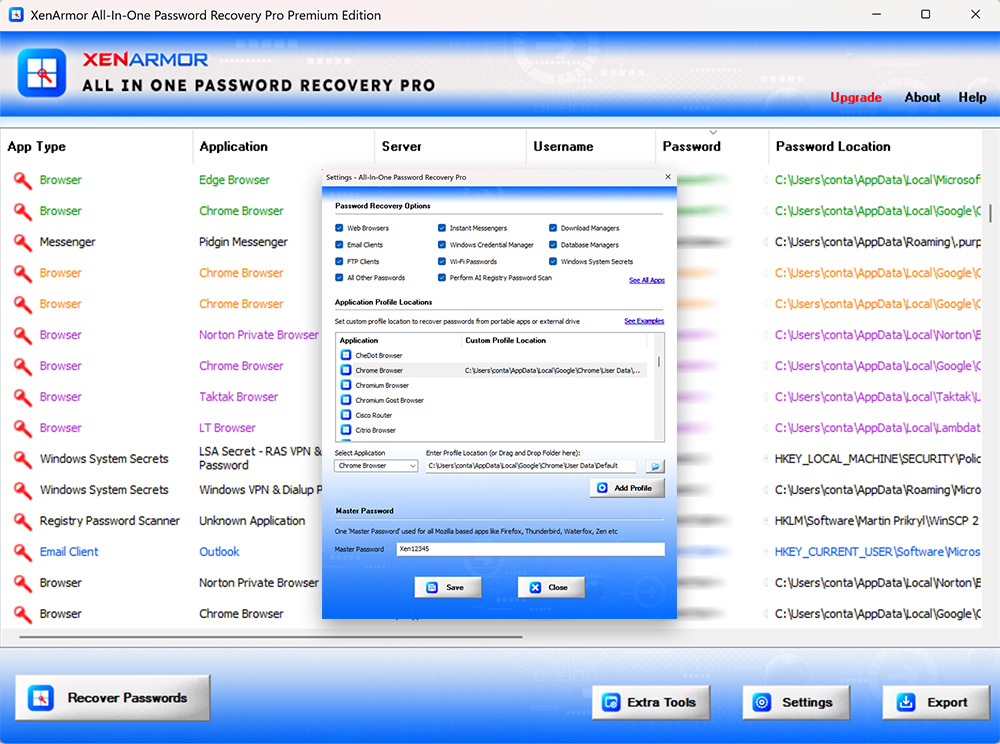
For more screenshots, detailed features, and benefits, please visit the product guide.
Product GuideWeb Browsers
- Chrome
- Edge
- Firefox
- Opera
- Brave
- Vivaldi
- + many more
Email Clients
- Outlook
- Thunderbird
- Mailbird
- eM Client
- Foxmail
- The Bat!
- + many more
FTP Clients
- FileZilla
- WinSCP
- CuteFTP
- Core FTP
- SmartFTP
- FlashFXP
- + many more
Database Tools
- RazorSQL
- Navicat MySQL
- Navicat PostgreSQL
- SQLite Maestro
- Firebird Maestro
- MySQL Query Browser
- + many more
Instant Messengers
- Trillian
- Pidgin
- Paltalk
- Digsby
- Spark IM
- Miranda IM
- + many more
Download Managers
- JDownloader
- FlashGet
- BitComet
- Internet Download Manager (IDM)
- Free Download Manager (FDM)
- Download Accelerator Plus (DAP)
- + many more
Windows Vault/Credential Mgr
- Microsoft Account
- Windows Mail App
- Outlook Exchange
- Microsoft Edge (old version)
- Remote Desktop Manager
- Network Domain Passwords
- + many more
Windows System Secrets
- BitLocker Keys
- AutoLogon Passwords
- Service Login Passwords
- LSA Secrets (SAM, LSA, BootKey etc)
- Windows VPN/Dial-up Passwords
- Windows User Account Passwords
- + many more
Other Windows Apps
- OpenVPN
- TeamViewer
- RealVNC
- AirDC++
- PokerStars
- Wi-Fi Passwords
- + many more
| Feature | GUI Version | Command-line Version |
|---|---|---|
| 330+ Apps Password Recovery | ||
| Payment Methods (Cards, Bank Accounts) | ||
| Web Autofill Secrets Recovery | ||
| Website Cookies Recovery | ||
| Custom Profile Recovery | ||
| Recovery Settings Panel | ||
| Command-line Options | Basic Export Only | Full Advanced Control |
| Remote Recovery Ready | ||
| Forensics-Ready | ||
| Run from USB | ||
| 100% Portable | ||
| License Activation | One Time | One Time |
| License Usage | Unlimited PCs | Unlimited PCs |

SECTIGO "EV Certified" Software
Verified for trusted, secure, and tamper-resistant software deployment.
XenArmor software is signed with an Extended Validation Code Signing Certificate issued after rigorous organization verification by SECTIGO, a globally trusted certificate authority.
- Run with confidence using verified, EV-certified software
- Install software from a trusted and authenticated publisher
- Recognized by Microsoft SmartScreen and leading antivirus engines
- Protected against tampering and unauthorized modifications
- Deploy safely across remote PCs and enterprise environments









The software automatically detects and decodes passwords from the default profile locations of all supported applications.
If an application uses a custom profile location, or if the data is copied from another user, PC, or external drive, you can specify the location from Settings → Custom Locations.
The software automatically recovers supported browser payment methods, including credit cards and bank account details, along with browser passwords.
Website autofill secrets are recovered using Browser Password Recovery Pro, which is included as a free gift with the Premium and Unlimited editions.
Yes, the software is 100% safe & secure to use
- Digi-signed with EV Certificate by Sectigo - ensuring authenticity & safety.
- Trusted by Antivirus and Windows SmartScreen
Intended for legitimate purposes only, such as:
- Recovery of your own passwords
- Recovery service for clients
- IT administration & auditing
- Digital forensics & investigations
- Security professionals & penetration testing
Note: Unauthorized access is strictly prohibited and may result in license termination.
Starting with version 14.0, the "External" DLLs folder is usually not required because the software directly decrypts passwords from modern Mozilla apps like Firefox, SeaMonkey, Zen, WaterFox, Thunderbird etc.
This supports Mozilla applications that use the newer key4.db database format, introduced with Firefox v58 and used since 2018.
If direct decryption fails, the software automatically uses the older NSS DLLs from the External folder.
So keep this folder for:
- Older Mozilla apps that use key3.db.
- Future encryption changes that may require NSS DLL-based recovery.
No, the software is designed for users of all skill levels.
With one-click, it can scan & recover all passwords automatically.
The Trial version is available for both Basic & Premium Edition.
It includes all features of the full version for evaluation with minor limitations,
- Shows only first 2 characters of recovered passwords
- Command-line features disabled
We recommend trying the Trial version before purchase to verify password recovery. If you need any assistance, feel free to contact our support team.
Generally free password tools flagged as PUA (Potentially Unwanted Applications) by antivirus.
However, this software is enterprise-grade and digitally signed with EV Code Certificate by Sectigo, a leading certificate authority - ensuring authenticity & safety.
This is typically a false positive. You can resolve it by:
- Adding the software to your antivirus whitelist/exclusions
- Temporarily disabling antivirus protection during installation/running
- Reporting the file to your antivirus vendor as a false positive
For Windows Defender, you can quickly add exclusions or temporarily disable protection using:
XenArmor Windows Defender Manager Pro
The "Unlimited Edition" trial is not offered for security reasons.You can test the Premium Edition Trial, which has the same features.
The Unlimited Edition adds 100% portablity and unlimited PCs support.
Ideal for IT administrators, technicians, forensic investigators, and security professionals.
Yes, the software supports password recovery from external drives using the Custom Location feature.
Simply specify the application’s profile path in Settings. But this software can recover it only if the passwords are not protected by user-specific encryption.
For 100% & automatic recovery from external drive, we recommend advanced software below,
XenArmor All-In-One External Drive Password Pro
Yes. It supports password recovery from Mozilla-based applications such as Firefox, Thunderbird, Postbox, SeaMonkey, Zen Browser etc
To recover these passwords, enter the master password in "Settings → Master Password" before starting the recovery process. For step-by-step instructions, refer to the product guide.
Yes, the "Unlimited Edition" is fully forensics-ready.
It leaves no file or registry footprints on target system and can be run from USB.
For advanced forensic investigations, we recommend:
XenArmor All-In-One External Drive Password Pro
It instantly recover all saved passwords from local computers and external drives.
For security professionals and penetration testers, we recommend the Command-Line version.
XenArmor All-In-One Password Pro Command-line (includes GUI version as Free Gift)
This may occur if the application has a new version with different encryption or profile location. It is also possible that no passwords are currently saved on your system.
Contact our support team with the application name and details such as version, profile location, screenshots for expert assistance — no charges, even for trial users.