

Password Recovery
How to Recover Forgotten Wi-Fi Password (Without Resetting Router)
Forgot your Wi-Fi password? Can’t connect to your network?
This is a very common issue. Most users set strong WiFi passwords for security and later forget them—especially when connecting a new device or after a long time.
But don’t worry—you’re in the right place. In this guide, we’ll show you simple and easy ways to recover your saved Wi-Fi password and reconnect to your network quickly without resetting your router.
How to Instantly Recover Wi-Fi Passwords
This method help you to easily & instantly recover all your lost Wi-Fi passwords without any technical knowledge.
With just one click, XenArmor Wi-Fi Password Recovery Pro can recover all your saved wireless connection passwords in seconds.
Follow these simple steps,
- Download & install the software from here
- Click on “Recover Passwords”
- Instantly see all your saved Wi-Fi passwords
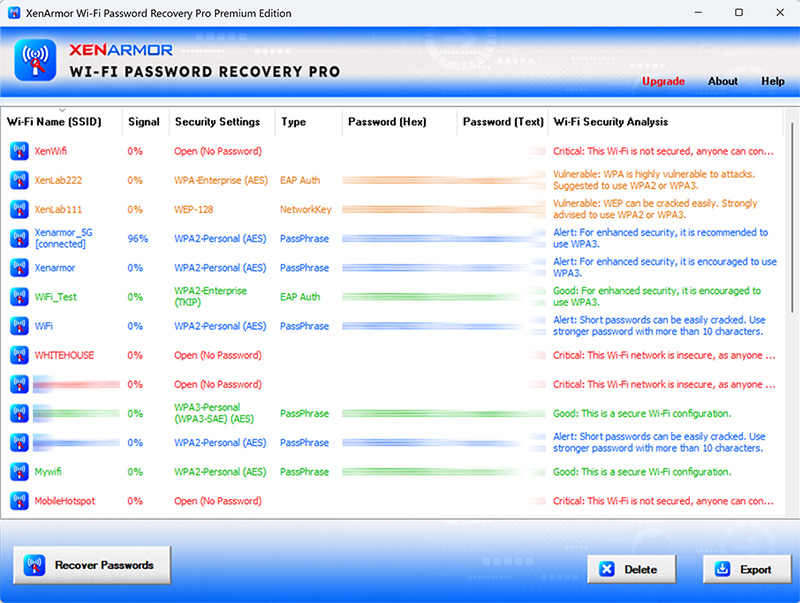
Here are the key features loved by users,
- Recover all type (WEP, WPA, WPA2, WPA3) of Wi-Fi passwords
- Detect insecure/vulnerable Wi-Fi connections
- Multi-colored display to identify secure & weak Wi-Fi connections
- Delete unused or secret Wi-Fi connection passwords
- Support command-line & automation
- Export passwords to PDF, HTML, CSV, JSON & more
👉 Free Download XenArmor Wi-Fi Password Recovery Pro
Recommended Products

All-In-One Password Recovery Pro
One PRO solution to recover payments, autofill, system secrets &...
Download
All-In-One Key Finder Pro
One PRO solution to recover hardware serials, system keys & lost license...
Download
Email Password Recovery Pro
Instantly recover forgotten email passwords of 130+ email services from...
Download