Recover 120+ Browser Passwords
Instantly recover all your lost website passwords from 120+ popular browsers


“From the World Leader #1 in Password Forensics”
Instantly recover all the lost website passwords of 120+ browsers from External Disk or local Windows computer


|
Free Download |

|
Buy Now |
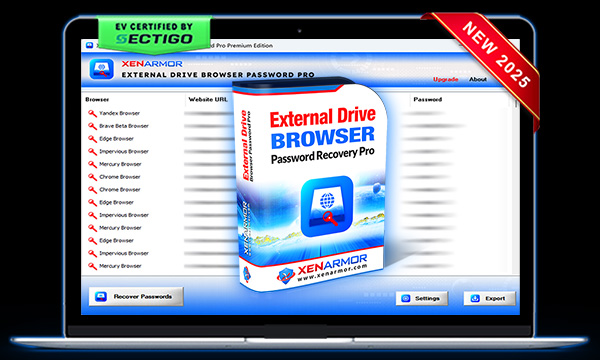
Trusted by Govt & Enterprises Worldwide

Instantly recover all your lost website passwords from 120+ popular browsers
Recover all browser passwords from external drive of crashed or dead PC
Find forgotten website passwords of all users on Local computer
Recover from custom profile locations or portable browsers
Recover passwords of both local & domain user accounts on External Drive
Support password recovery from both 32-bit & 64-bit browsers
100% browser password recovery from external drive using Master Key Decryption method
Recover from Mozilla based browsers protected with master password
Command-line for automation & to run via custom scripts
Save all recovered passwords to HTML, CSV, XML, JSON or SQLite file
Run on Unlimited PCs from USB disk without installation or activation
Works on all 32-bit & 64-bit platforms from Windows Vista to new Windows 11


Benefits of XenArmor EV Certified Software,
Recover All Website Passwords from External or Local PC
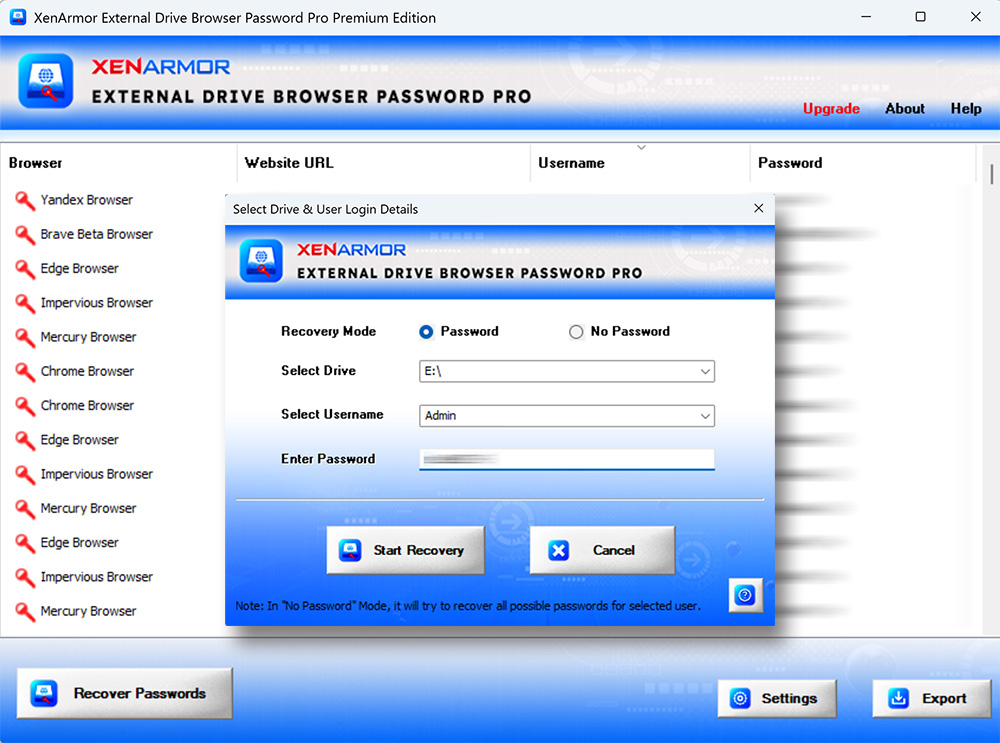
For more screenshots, detailed features & benefits please visit user guide
Please Note: Password Recovery from Chrome v140+ (and in future, may be for other browsers like Edge, Brave, Vivaldi etc) is supported only on local PC for all users. But not supported from External Disk due to new Windows CNG based key encryption.
In such cases, for 100% successful recovery, we need to run this software on same PC (logged in as any user).


Adopted by top Government Agencies and Corporations worldwide
Digitally signed with EV Certificate by SECTIGO, world's leading CA Authority
Trusted by Microsoft Smartscreen and top Antivirus solutions
Unmatched expertise in releasing 275+ free & enterprise security softwares
Decades of experience in delivering premium quality security softwares
Helped over 31 Million users & enterprises from 170+ countries
Featured and awarded by top software publishers & magazines globally
Experience secure online shopping powered by 256-bit SSL encryption
Supported by round the clock PRO service to all the customers
Contents
About
 XenArmor External Drive Browser Password Pro is the first ever enterprise software to instantly recover all browser passwords from External Drive of crashed or non-bootable Windows computer.
Powered by “Advanced Master Key Decryption” technique, it can help in 100% recovery of all your website passwords from external drive of dead computer.
Not just External Drive, it can also recover browser passwords (of all users) from Local computer also.
XenArmor External Drive Browser Password Pro is the first ever enterprise software to instantly recover all browser passwords from External Drive of crashed or non-bootable Windows computer.
Powered by “Advanced Master Key Decryption” technique, it can help in 100% recovery of all your website passwords from external drive of dead computer.
Not just External Drive, it can also recover browser passwords (of all users) from Local computer also.
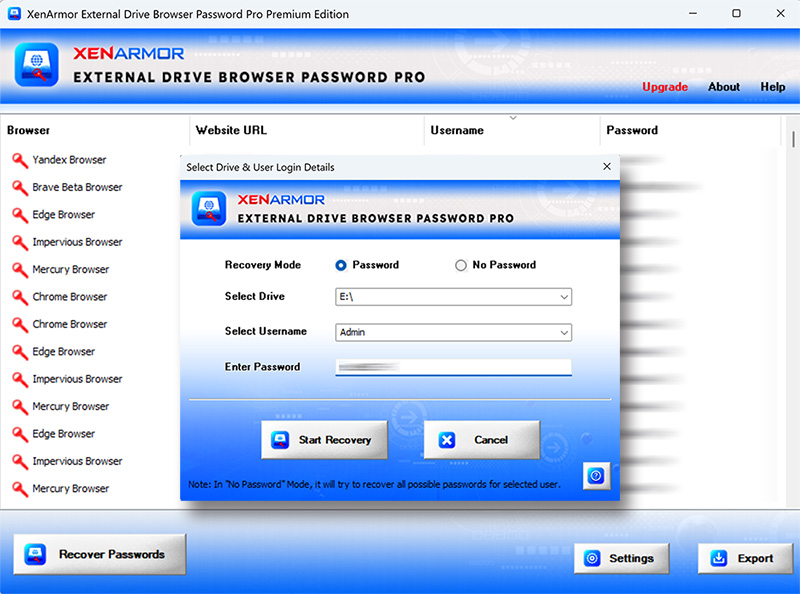
Website Password Recovery from 120+ Top Browsers
XenArmor External Drive Browser Password Pro supports password recovery from following popular browsers,
|
|
|
Features & Benefits
Requirements
XenArmor External Drive Browser Password Pro works on both 32-bit & 64-bit platforms starting from Windows Vista to Windows 11. Here are the specific details,Installation
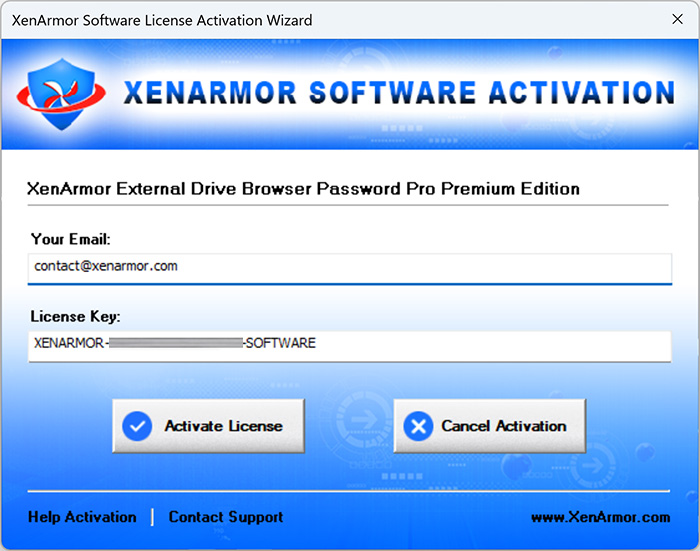
XenArmor External Drive Browser Password Pro comes with standard windows installer which allows seamless installation & un-installation. Launch the setup file and follow on-screen instructions to complete the installation as shown below,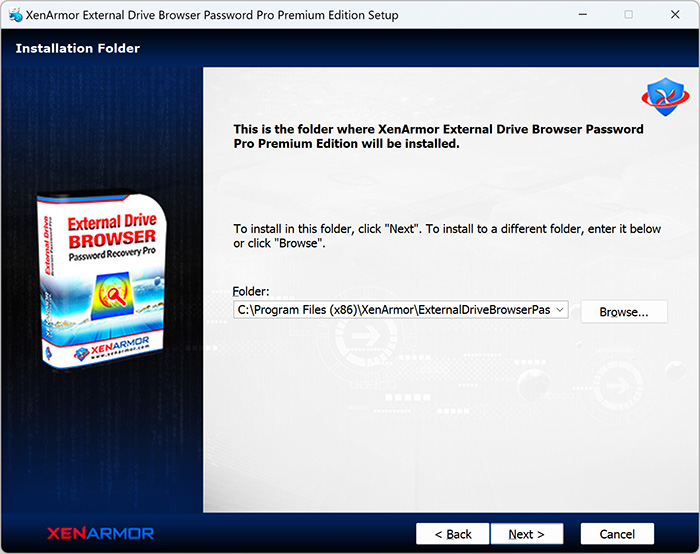 After installation, it will launch your software showing activation screen as follows,
 Anytime, you can uninstall it directly from the Windows Add/Remove Programs.
How to Use?
XenArmor External Drive Browser Password Pro is very easy to use & with a click of button any one can recover their lost passwords.Follow the simple steps below to recover your passwords from external or local drive.
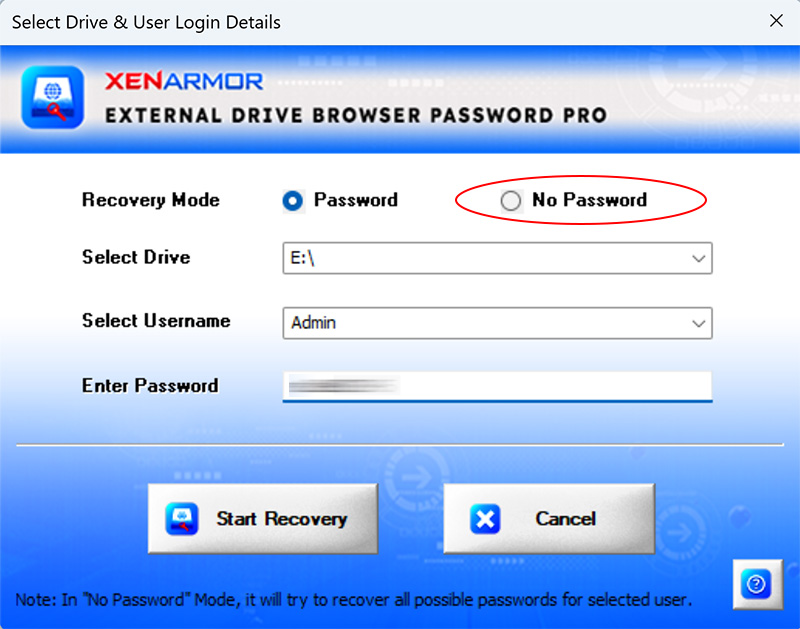 Here are various scenarios for user password,
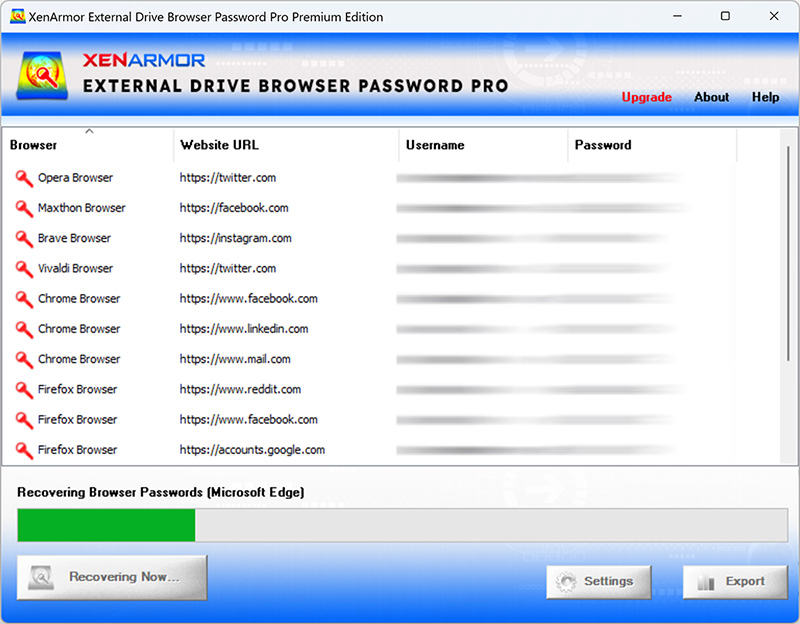 You can easily sort the list by clicking on any columns (Browser, Website, Username or Password) in the displayed list.
Also you can export the passwords to HTML, CSV, XML, JSON or SQLite file for backup or store it to cloud.
You can easily sort the list by clicking on any columns (Browser, Website, Username or Password) in the displayed list.
Also you can export the passwords to HTML, CSV, XML, JSON or SQLite file for backup or store it to cloud.
Right Click Menu Options
Right click context menu helps you to quickly & easily copy various fields (such as Browser, Website URL, Username, Password etc).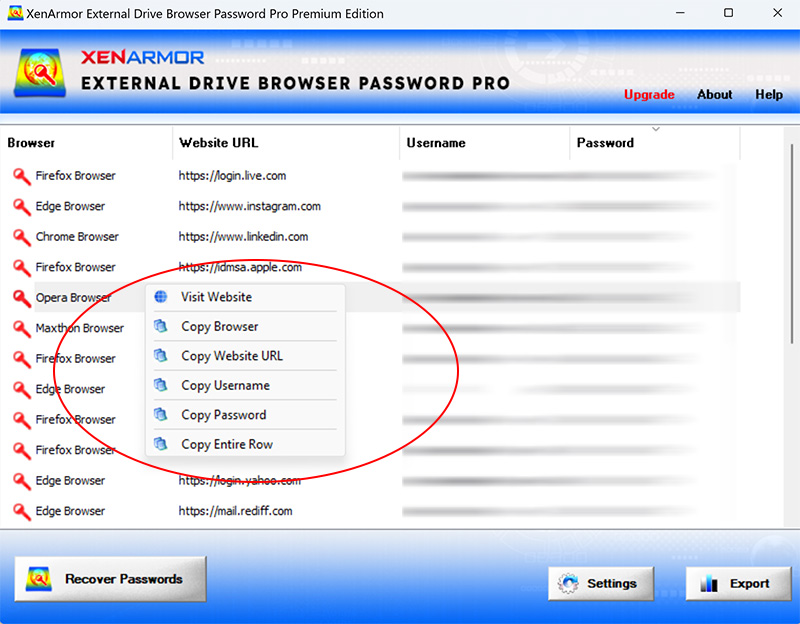
Settings
Settings Panel help you to tweak & customize password recovery operations as per you need. Mainly it helps you to specify custom profile locations & set master password options. To launch, simply click on ‘Settings’ button from the main GUI screen and you will see the Settings Panel as shown below,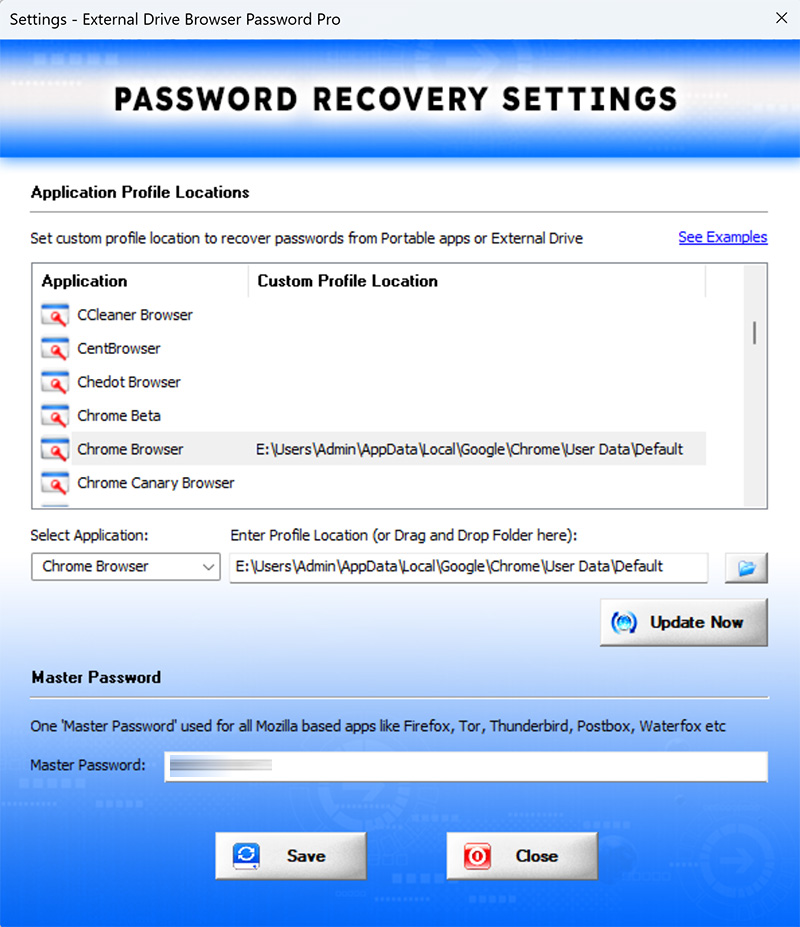 Refer to below sections for more details on each of the sections in Settings screen.
Settings - Customize Application Profile Location
This is one of the unique benefits of XenArmor External Drive Browser Password Pro. It helps you to specify the custom profile locations for apps. This is very useful when you want to recover passwords from portable apps, non-default profile locations or profiles copied from external drive of another PC.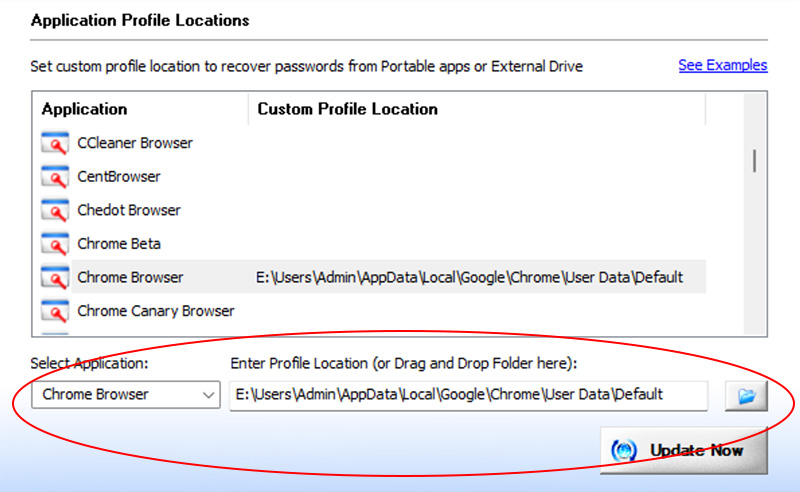
Follow these simple steps to manage custom profile locations for any application.
Once finished, head back to the main screen and click “Recover Passwords” to recover passwords from your new custom locations.
Profile Locations for All Browsers
Listed below are the default profile locations for all supported browsers. If your browser uses a different path, or you want to select a profile of another user, simply enter the path using the "Custom Location" option described above.| Browser | Profile Location |
|---|---|
| 360 Extreme Browser | C:\Users\[user_name]\AppData\Local\360extremebrowser\Chrome\User Data\Default\ |
| 360 Secure Browser | C:\Users\[user_name]\AppData\Local\360SecureBrowser\Chrome\User Data\Default\ |
| 7Star Browser | C:\Users\[user_name]\AppData\Local\7Star\7Star\User Data\Default\ |
| Adblock Browser | C:\Users\[user_name]\AppData\Local\AdblockBrowser\User Data\Default\ |
| Aloha Browser | C:\Users\[user_name]\AppData\Local\Aloha Mobile\Aloha\User Data\Default\ |
| Amigo Browser | C:\Users\[user_name]\AppData\Local\Amigo\User Data\Default\ |
| AMP Browser | C:\Users\[user_name]\AppData\Local\AMPbrowser\User Data\Default\ |
| AOL Shield Browser | C:\Users\[user_name]\AppData\Local\AOL\AOL Shield\User Data\Default\ |
| Apple Safari | C:\Users\[user_name]\AppData\Roaming\Apple Computer\Preferences\ |
| Arc Browser | C:\Users\[user_name]\AppData\Local\Packages\TheBrowserCompany.Arc_ttt1ap7aakyb4\LocalCache\Local\Arc\User Data\Default\ |
| ArtisBrowser | C:\Users\[user_name]\AppData\Roaming\ArtistScope\ArtisBrowser\Profiles\[random_name]\ |
| Atom Browser | C:\Users\[user_name]\AppData\Local\Mail.Ru\Atom\User Data\Default\ |
| Avant Browser | C:\Users\[user_name]\AppData\Roaming\Avant Profiles\.default\formdata\ |
| Avast Secure Browser | C:\Users\[user_name]\AppData\Local\AVAST Software\Browser\User Data\Default\ |
| AVG Secure Browser | C:\Users\[user_name]\AppData\Local\AVG\Browser\User Data\Default\ |
| Basilisk Browser | C:\Users\[user_name]\AppData\Roaming\Moonchild Productions\Basilisk\Profiles\[random_name]\ |
| Beacon Browser | C:\Users\[user_name]\AppData\Local\impervious\Beacon\User Data\Default\ |
| Bittube Browser | C:\Users\[user_name]\AppData\Roaming\BitTube\BitTubeBrowser\Profiles\[random_name]\ |
| BlackHawk Browser | C:\Users\[user_name]\AppData\Roaming\NETGATE Technologies\BlackHawk\Profiles\[random_name]\ |
| Blisk Browser | C:\Users\[user_name]\AppData\Local\Blisk\User Data\Default\ |
| Brave Beta Browser | C:\Users\[user_name]\AppData\Local\BraveSoftware\Brave-Browser-Beta\User Data\Default\ |
| Brave Browser | C:\Users\[user_name]\AppData\Local\BraveSoftware\Brave-Browser\User Data\Default\ |
| Brave Nightly Browser | C:\Users\[user_name]\AppData\Local\BraveSoftware\Brave-Browser-Nightly\User Data\Default\ |
| Carbon Browser | C:\Users\[user_name]\AppData\Local\Carbon\Browser\User Data\Default\ |
| Catsxp Browser | C:\Users\[user_name]\AppData\Local\CatsxpSoftware\Catsxp-Browser\User Data\Default\ |
| CCleaner Browser | C:\Users\[user_name]\AppData\Local\CCleaner Browser\User Data\Default\ |
| CentBrowser | C:\Users\[user_name]\AppData\Local\CentBrowser\User Data\Default\ |
| Chedot Browser | C:\Users\[user_name]\AppData\Local\Chedot\User Data\Default\ |
| Chrome | C:\Users\[user_name]\AppData\Local\Google\Chrome\User Data\Default\ |
| Chrome Beta | C:\Users\[user_name]\AppData\Local\Google\Chrome Beta\User Data\Default\ |
| Chrome Canary Browser | C:\Users\[user_name]\AppData\Local\Google\Chrome SxS\User Data\Default\ |
| Chrome Dev Browser | C:\Users\[user_name]\AppData\Local\Google\Chrome Dev\User Data\Default\ |
| Chromium Browser | C:\Users\[user_name]\AppData\Local\Chromium\User Data\Default\ |
| Chromium Gost Browser | C:\Users\[user_name]\AppData\Local\Chromium\User Data\Default\ |
| Citrio Browser | C:\Users\[user_name]\AppData\Local\CatalinaGroup\Citrio\User Data\Default\ |
| Cliqz Browser | C:\Users\[user_name]\AppData\Roaming\CLIQZ\Profiles\[random_name]default\ |
| Coc Coc Browser | C:\Users\[user_name]\AppData\Local\CocCoc\Browser\User Data\Default\ |
| Comet AI Browser | C:\Users\[user_name]\AppData\Local\Perplexity\Comet\User Data\Default\ |
| Cometbird Browser | C:\Users\[user_name]\AppData\Roaming\CometNetwork\CometBird\Profiles\[random_name]\ |
| Comodo Dragon | C:\Users\[user_name]\AppData\Local\Comodo\Dragon\User Data\Default\ |
| Comodo IceDragon Browser | C:\Users\[user_name]\AppData\Roaming\Comodo\IceDragon\Profiles\[random_name]\ |
| CoolNovo Browser | C:\Users\[user_name]\AppData\Local\MapleStudio\ChromePlus\User Data\Default\ |
| Coowon Browser | C:\Users\[user_name]\AppData\Local\Coowon\Coowon\User Data\Default\ |
| Cromite Browser | C:\Users\[user_name]\AppData\Local\Cromite\User Data\Default\ |
| CryptoTab Browser | C:\Users\[user_name]\AppData\Local\CryptoTab Browser\User Data\Default\ |
| Cyberfox Browser | C:\Users\[user_name]\AppData\Roaming\8pecxstudios\Cyberfox\Profiles\[random_name]\ |
| DCBrowser | C:\Users\[user_name]\AppData\Local\DcBrowser\User Data\Default\ |
| Decentr Browser | C:\Users\[user_name]\AppData\Local\Decentr\Decentr\User Data\Default\ |
| Dot Browser | C:\Users\[user_name]\AppData\Roaming\dot\Profiles\[random_name]\ |
| Ecosia Browser | C:\Users\[user_name]\AppData\Local\EcosiaBrowser\User Data\Default\ |
| Edge Beta Browser | C:\Users\[user_name]\AppData\Local\Microsoft\Edge Beta\User Data\Default\ |
| Edge Browser | C:\Users\[user_name]\AppData\Local\Microsoft\Edge\User Data\Default\ |
| Edge Canary Browser | C:\Users\[user_name]\AppData\Local\Microsoft\Edge Canary\User Data\Default\ |
| Edge Dev Browser | C:\Users\[user_name]\AppData\Local\Microsoft\Edge Dev\User Data\Default\ |
| Elements Browser | C:\Users\[user_name]\AppData\Local\Elements Browser\User Data\Default\ |
| Epic Privacy Browser | C:\Users\[user_name]\AppData\Local\Epic Privacy Browser\User Data\Default\ |
| Falkon (QupZilla) | C:\Users\[user_name]\AppData\Local\falkon\profiles\default\ |
| Firefox | C:\Users\[user_name]\AppData\Roaming\Mozilla\Firefox\Profiles\[random_name]\ |
| Firefox Beta Browser | C:\Users\[user_name]\AppData\Roaming\Floorp\Profiles\[random_name-beta]\ |
| Firefox Developer Browser | C:\Users\[user_name]\AppData\Roaming\Floorp\Profiles\[random_name-dev-edition]\ |
| Firefox Nightly Browser | C:\Users\[user_name]\AppData\Roaming\Floorp\Profiles\[random_name-nightly]\ |
| Flock Browser | C:\Users\[user_name]\AppData\Local\Flock\User Data\Default\ |
| Floorp Browser | C:\Users\[user_name]\AppData\Roaming\Floorp\Profiles\[random_name]\ |
| Garena Messenger | C:\Users\[user_name]\AppData\Roaming\GarenaPlus\ |
| Gener8 Browser | C:\Users\[user_name]\AppData\Local\Gener8\User Data\Default\ |
| Genspark AI Browser | C:\Users\[user_name]\AppData\Local\GensparkSoftware\Genspark-Browser\User Data\Default\ |
| Ghost Browser | C:\Users\[user_name]\AppData\Local\GhostBrowser\User Data\Default\ |
| Herond Browser | C:\Users\[user_name]\AppData\Local\HerondLabs\Herond-Browser\User Data\Default\ |
| Hola Browser | C:\Users\[user_name]\AppData\Roaming\Hola\chromium_profile\Default\ |
| Huawei Browser | C:\Users\[user_name]\AppData\Local\Huawei\HuaweiBrowser\User Data\Default\ |
| IceCat Browser | C:\Users\[user_name]\AppData\Roaming\Mozilla\icecat\Profiles\[random_name]\ |
| Impervious Browser | C:\Users\[user_name]\AppData\Roaming\Impervious Browser\Profiles\[random_name]\ |
| Insomniac Browser | C:\Users\[user_name]\AppData\Local\InsomniacBrowser\User Data\Default\ |
| Iridium Browser | C:\Users\[user_name]\AppData\Local\Iridium\User Data\Default\ |
| K-Meleon Browser | C:\Users\[user_name]\AppData\Roaming\K-Meleon\[random_name]\ |
| Kinza Browser | C:\Users\[user_name]\AppData\Local\Kinza\User Data\Default\ |
| Kometa Browser | C:\Users\[user_name]\AppData\Local\Kometa\User Data\Default\ |
| LibreWolf Browser | C:\Users\[user_name]\AppData\Roaming\librewolf\Profiles\[random_name]\ |
| LT Browser | C:\Users\[user_name]\AppData\Local\Lambdatest\LT Browser\User Data\Default\ |
| Maxthon 5.x | C:\Users\[user_name]\AppData\Roaming\Maxthon5\Users\guest\MagicFill\ |
| Maxthon 6.x | C:\Users\[user_name]\AppData\Local\Maxthon\Application\User Data\Default\ |
| Mercury Browser | C:\Users\[user_name]\AppData\Roaming\mercury\Profiles\[random_name]\ |
| Midori Browser | C:\Users\[user_name]\AppData\Roaming\Midori\Profiles\[random_name]\ |
| NEO Browser | C:\Users\[user_name]\AppData\Local\NEO\User Data\Default\ |
| Netbox Browser | C:\Users\[user_name]\AppData\Local\NetboxBrowser\User Data\Default\ |
| Netscape Browser | C:\Users\[user_name]\AppData\Local\AOL\Netscape\User Data\Default\ |
| Norton Private Browser | C:\Users\[user_name]\AppData\Local\Norton\Browser\User Data\Default\ |
| Opera Air Browser | C:\Users\[user_name]\AppData\Roaming\Opera Software\Opera Air Stable\ |
| Opera Browser | C:\Users\[user_name]\AppData\Roaming\Opera Software\Opera Stable\ |
| Opera Crypto Browser | C:\Users\[user_name]\AppData\Roaming\Opera Software\Opera Crypto Developer\ |
| Opera GX Browser | C:\Users\[user_name]\AppData\Roaming\Opera Software\Opera GX Stable\ |
| Opera Neon Browser | C:\Users\[user_name]\AppData\Local\Opera Software\Opera Neon\User Data\Default\ |
| Orbitum Browser | C:\Users\[user_name]\AppData\Local\Orbitum\User Data\Default\ |
| Pale Moon Browser | C:\Users\[user_name]\AppData\Roaming\Moonchild Productions\Pale Moon\Profiles\[random_name]\ |
| Pirate Browser | C:\Downloads\Pirate.Tor.Browser.11.0\Browser\TorBrowser\Data\Browser\profile.default\ |
| Power Browser | C:\Users\[user_name]\AppData\Local\PowerSoftware\Power-Browser\User Data\Default\ |
| Pulse Browser | C:\Users\[user_name]\AppData\Roaming\pulse-browser\Profiles\[random_name]\ |
| QQ Browser (Tencent) | C:\Users\[user_name]\AppData\Local\Tencent\QQBrowser\User Data\Default\ |
| SalamWeb Browser | C:\Users\[user_name]\AppData\Local\SalamWeb\User Data\Default\ |
| Sanbrowser | C:\Users\[user_name]\AppData\Local\Sanbrowser\User Data\Default\ |
| Seamonkey Beta | C:\Users\[user_name]\AppData\Roaming\Mozilla\SeaMonkey\Profiles\[random_name]\ |
| SeaMonkey Browser | C:\Users\[user_name]\AppData\Roaming\Mozilla\SeaMonkey\Profiles\[random_name]\ |
| Shift Browser | C:\Users\[user_name]\AppData\Local\ShiftData\User Data\Default\ |
| Sidekick Browser | C:\Users\[user_name]\AppData\Local\Sidekick\User Data\Default\ |
| Sielo Browser | C:\Users\[user_name]\AppData\Local\Sielo\profiles\default\ |
| Sleipnir Browser | C:\Users\[user_name]\AppData\Roaming\Fenrir Inc\Sleipnir5\setting\modules\ChromiumViewer\Default\ |
| SlimBrowser | C:\Users\[user_name]\AppData\Roaming\FlashPeak\SlimBrowser\Profiles\[random_name]\ |
| Slimjet Browser | C:\Users\[user_name]\AppData\Local\Slimjet\User Data\Default\ |
| Sogou Explorer | C:\Users\[user_name]\AppData\Roaming\SogouExplorer\Webkit\Default\ |
| Sputnik Browser | C:\Users\[user_name]\AppData\Local\Sputnik\Sputnik\User Data\Default\ |
| SRWare Iron Browser | C:\Users\[user_name]\AppData\Local\Chromium\User Data\Default\ |
| SSuite NetSurfer Browser | C:\Users\[user_name]\AppData\Roaming\SSuite Office\NetSurfer Cache\EBWebView\Default\ |
| SSuite NetSurfer Extreme | C:\Users\[user_name]\AppData\Roaming\SSuite Office\NetSurfer Cache\EBWebView\Default\ |
| Stack Next SE Browser | C:\Users\[user_name]\AppData\Roaming\Stack Next SE\root\ |
| Superbird Browser | C:\Users\[user_name]\AppData\Local\Superbird\User Data\Default\ |
| Swing Browser | C:\Users\[user_name]\AppData\Local\SwingBrowser\User Data\Default\ |
| Taktak Browser | C:\Users\[user_name]\AppData\Local\Taktak\User Data\Default\ |
| Tempest Browser | C:\Users\[user_name]\AppData\Local\TempestBrowser\User Data\Default\ |
| Thorium Browser | C:\Users\[user_name]\AppData\Local\Thorium\User Data\Default\ |
| Tor Browser (portable) | C:\Users\[user_name]\Desktop\Tor Browser\Browser\TorBrowser\Data\Browser\profile.default\ |
| Torch Browser | C:\Users\[user_name]\AppData\Local\Torch\User Data\Default\ |
| Tusk Browser | C:\Users\[user_name]\AppData\Local\TUSK Browser\User Data\Default\ |
| UC Browser | C:\Users\[user_name]\AppData\Local\UCBrowser\User Data_i18n\Default\ |
| Ulaa Browser | C:\Users\[user_name]\AppData\Local\Zoho\Ulaa\User Data\Default\ |
| Ultimatum Browser | C:\Users\[user_name]\AppData\Local\Chromium\User Data\Default\ |
| Undetectable Browser | C:\Users\[user_name]\AppData\Local\Undetectable\Profiles\[random_name]\Default\ |
| Ungoogled Chromium | C:\Users\[user_name]\AppData\Local\Chromium\User Data\Default\ |
| UR Browser | C:\Users\[user_name]\AppData\Local\URBrowser\User Data\Default\ |
| Uran Browser | C:\Users\[user_name]\AppData\Local\uCozMedia\Uran\User Data\Default\ |
| Viasat Browser | C:\Users\[user_name]\AppData\Local\ViaSat\Viasat Browser\User Data\Default\ |
| Vivaldi Browser | C:\Users\[user_name]\AppData\Local\Vivaldi\User Data\Default\ |
| Vivaldi Snapshot | C:\Users\[user_name]\AppData\Local\Vivaldi\User Data\Default\ |
| Waterfox Browser | C:\Users\[user_name]\AppData\Roaming\Waterfox\Profiles\[random_name]\ |
| Wave Browser | C:\Users\[user_name]\AppData\Local\WaveBrowser\User Data\Default\ |
| Wavebox Browser | C:\Users\[user_name]\AppData\Local\WaveboxApp\User Data\Default\ |
| Whale Browser | C:\Users\[user_name]\AppData\Local\Naver\Naver Whale\User Data\Profile [number]\ |
| Xvast Browser | C:\Users\[user_name]\AppData\Local\Xvast\User Data\Default\ |
| Yandex Browser | C:\Users\[user_name]\AppData\Local\Yandex\YandexBrowser\User Data\Default\ |
| Zen Browser | C:\Users\[user_name]\AppData\Roaming\zen\Profiles\[random_name]\ |
Settings - Master Password
Last section in Settings panel helps you to set Master Password. This is one master password which will be tried for all Mozilla based browsers like Firefox, Tor, WaterFox etc.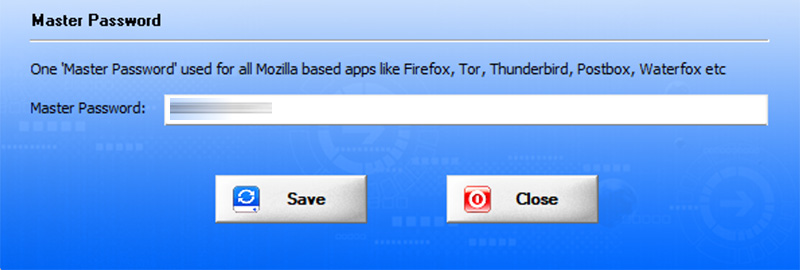
Password Recovery Report
XenArmor External Drive Browser Password Pro helps you to generate detailed report in HTML, CSV, XML, JSON or SQLite Database format. To generate report, after the password recovery, click on Report button and then select the Type of Report (HTML, CSV, XML, JSON, SQLite) from the ‘File Save Dialog’. Here is the sample of HTML Password Report,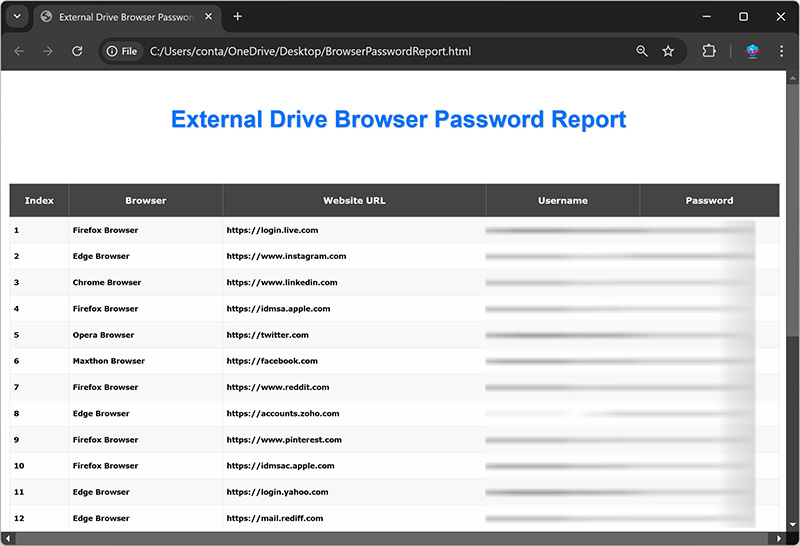
How to Use Command-line Options?
XenArmor External Drive Browser Password Pro also supports command-line options. It helps you to fully automate password recovery or use in your scripts or programs. Here is the screenshot of using Command-line options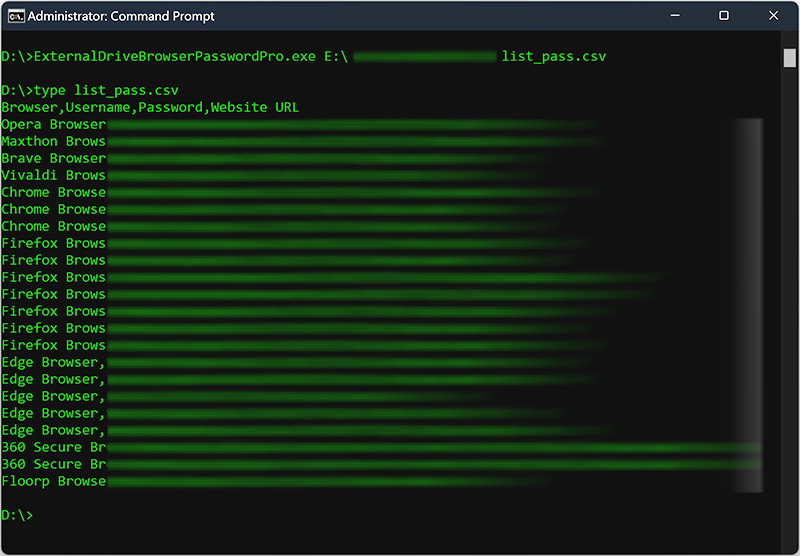 Here are various command-line options & examples
ExternalDriveBrowserPasswordPro.exe  [drive] [username] [password] [report_file]

// Recover and save the password report in HTML format (default)
ExternalDriveBrowserPasswordPro.exe E:\ admin pass123 report.html

// Recover and save the password report to CSV file
ExternalDriveBrowserPasswordPro.exe C:\ test pass1 report.csv

// Recover and save the password report to XML file
ExternalDriveBrowserPasswordPro.exe E:\ admin pass123 "c:\my reports\report.xml"

// Recover and save the password report to JSON file
ExternalDriveBrowserPasswordPro.exe C:\ administrator pass5 report.json

// Recover and save the password report to SQLite database file
ExternalDriveBrowserPasswordPro.exe E:\ admin pass123 report.db
Advanced Feature - Support for Master Password
This software also helps you to recover passwords from apps having Master Password. Now you can set single Master Password in Settings and it will be automatically used for all the Mozilla based browsers such as Firefox, Tor, WaterFox etc. First it will try with empty master password. If that fails, it will then try with specified Master Password to successfully recover passwords. For more details refer to "Settings - Master Password section" Please note this software does not bypass Master Password protection. User need to specify the correct Master Password to recover the stored passwords.Advanced Feature - Recover from Custom Profile Location
XenArmor External Drive Browser Password Pro supports Custom Profile Location feature helping you to recover passwords from portable browsers or profiles copied from another computer. Often applications change their profile location with every release or some times users choose different location. In such cases automatic recovery will not work as the location has changed. In such cases this "Custom Profile Location" feature will help you to easily specify the changed location and recover all the passwords. You can easily set the Custom Profile location for each of the supported apps through Settings. For more details, refer to "Settings - Custom Profile Path Section"Automation of Password Recovery
XenArmor External Drive Browser Password Pro comes with command-line options that can help you to fully automate your password recovery operations daily or periodically. It can generate detailed report in CSV, XML, JSON or HTML format which can be used for future auditing or backup purposes. Here are simple steps to automate password recovery using Windows Task Scheduler.1) Launch Windows Task Scheduler from Administrative Tools in Control Panel. Next click on "Create Basic Task" on right side panel
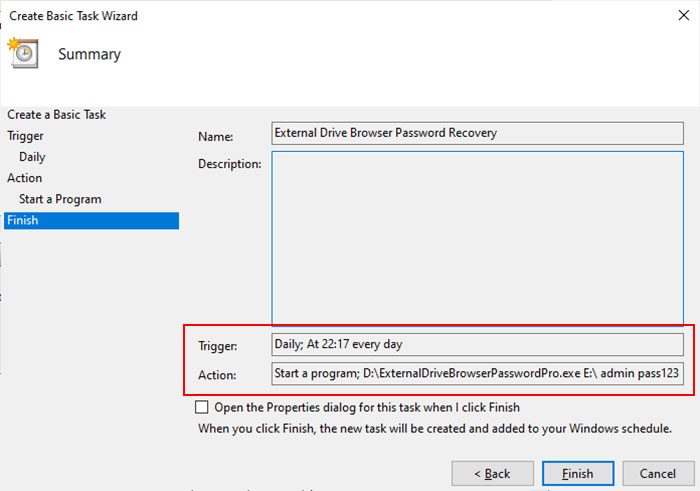
2) On the Basic Task page, enter name as 'External Drive Browser Password Recovery'. On next page select 'Daily or Weekly or Monthly' with appropriate Time settings as per your need
3) Next on the 'Action' Page, click on Start Program and then enter command & arguments as shown below,
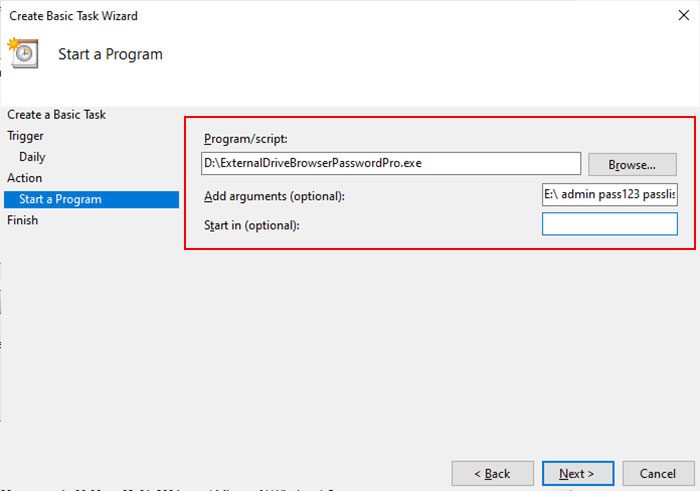 For more command-line options refer to External Drive Browser Password Pro Command-line Version section.
4) Finally click on Finish button to schedule your automatic password recovery operation.
Frequently Asked Questions
It uses advanced “Master Key Decryption” method to automatically recover website passwords of all users from both local as well as external drive from all supported browsers.
This new "No Password" mode allows you to recover browser passwords from an external drive even when the user login password is unknown or forgotten.
Normally, external drive recovery requires the Windows user password. However, this mode attempts to recover all possible passwords without it. But in this case, some application passwords may not be recovered if they use user-based encryption.
This makes it a reliable tool for digital forensics as well as personal recovery from crashed hard drive.
Yes, the software is 100% safe & secure to use
Intended for legitimate purposes only, such as:
Note: Unauthorized access is strictly prohibited and may result in license termination.
No, the software is designed for users of all skill levels.
With one-click, it can scan & recover all passwords automatically.
The Trial version is available for both Basic & Premium Edition.
It includes all features of the full version for evaluation with minor limitations,
We recommend trying the Trial version before purchase to verify password recovery. If you need any assistance, feel free to contact our support team.
Generally free password tools flagged as PUA (Potentially Unwanted Applications) by antivirus.
However, this software is enterprise-grade and digitally signed with EV Code Certificate by Sectigo, a leading certificate authority - ensuring authenticity & safety.
This is typically a false positive. You can resolve it by:
For Windows Defender, you can quickly add exclusions or temporarily disable protection using:
XenArmor Windows Defender Manager Pro
The "Unlimited Edition" trial is not offered for security reasons.You can test the Premium Edition Trial, which has the same features.
The Unlimited Edition adds 100% portability and unlimited PCs support.
Ideal for IT administrators, technicians, forensic investigators, and security professionals.
Yes, this software is ideal for digital forensics and investigation. The "Unlimited Edition" is fully forensics-ready.
For advanced forensic analysis & to recover all passwords, we recommend:
XenArmor All-In-One External Drive Password Pro
Yes, Premium and higher editions include command-line (CLI) support, allowing you to automate password recovery tasks or run it from your scripts.
For detailed usage and examples, please refer to the User Guide.
For security professionals and penetration testers, we recommend;
This may occur if the application has a new version with different encryption or profile location. It is also possible that no passwords are currently saved on your system.
Contact our support team with the application name and details such as version, profile location, screenshots for expert assistance — no charges, even for trial users.
Version & Release History
Version 6.0 (2025 Edition): 28th Nov 2025
Major upgrade to v2025 with new "No Password Mode" helping you to recover all possible website passwords without user login password or master keys.
Version 5.0 (2025 Edition): 14th Nov 2025
Grand 2025 release with following major updates
Version 4.0 (2024 Edition): 19th Nov 2024
Mega 2024 release with following updates
Version 3.0 (2023 Edition): 29 Apr 2024
Important software release now signed with new EV code certificate from Sectigo, the world leading certificate authority (CA). This greatly enhances trust and reduces Antivirus false positive warning. Also changed names of Personal/Enterprise Edition to Basic/Premium Edition respectively to make it more user friendly.
Version 2.0 (2023 Edition): 7th Sep 2023
Important release with following updates
Version 1.0 (2023 Edition): 21st May 2023
First public release
Contact XenArmor
Have any more queries or need any technical clarification? Just write to us at support@xenarmor.com. For more details visit home page of XenArmor External Drive Browser Password Pro
Instantly recover all your lost browser passwords from External Disk of crashed PC or local Windows computer
|
|
Free Download |
|
|
Buy Now |