Password Secrets of Popular Browsers, Email Clients, FTP Clients, Messengers, Download Managers


Everyday we use lot of apps to browse internet, check emails, chat with our friends, transfer & download files etc.
Most of these applications require us to login to access the services. And when we enter login password for the first time, these apps save our passwords in local computer so that we don’t have to type it every time.
This in-depth research guide explains where popular applications store passwords and how to decrypt and recover lost credentials quickly and securely.
In short these Password Secret articles will help you to know,
- Where to find your saved passwords
- How these passwords are stored (storage format, encryption)
- How to recover the saved passwords
- How to remove stored passwords from computer
- How to backup or move your passwords to another computer
Below are the password secrets of over 300+ popular apps in different categories such as browsers, email clients, FTP clients, Messengers, Download Managers etc.

Password Secrets of Popular Web Browsers
Learn the password secrets of 140+ web browsers such as Chrome, Firefox, IE, Edge, Brave, Opera, Vivaldi, Yandex etc.

Password Secrets of Popular Email Clients
Learn the password secrets of popular email clients such as Outlook, Thunderbird, Mailbird, eM Client, Claws Mail etc.

Password Secrets of Popular Messengers
Learn the password secrets of top messengers such as GG, GTalk, Skype, Trillian, Nimbuzz, Paltalk etc.

Password Secrets of Popular FTP Clients
Learn the password secrets of top 40+ FTP apps such as FileZilla, SmartFTP, Core FTP, CuteFTP, Cyberduck etc.

Password Secrets of Popular Downloaders
Learn the password secrets of top downloaders such as IDM, Orbit, FlashGet, FDM, DAP, JDownloader etc.

Password Secrets of Other Windows Apps
Learn the password secrets of other Windows apps like VNC, PokerStars, AirDc++, Adi IRC, RazorSQL, OpenVPN etc
How to Recover All Your Passwords Automatically
If you ever forget password for any of the above apps, now you can easily & instantly recover all your lost passwords without any technical knowledge.
With just one click, XenArmor All-In-One Password Recovery Pro can recover all your saved login passwords in seconds.
Follow these simple steps,
- Download & install the software from here
- Click on “Recover Passwords”
- Instantly see all your saved login passwords
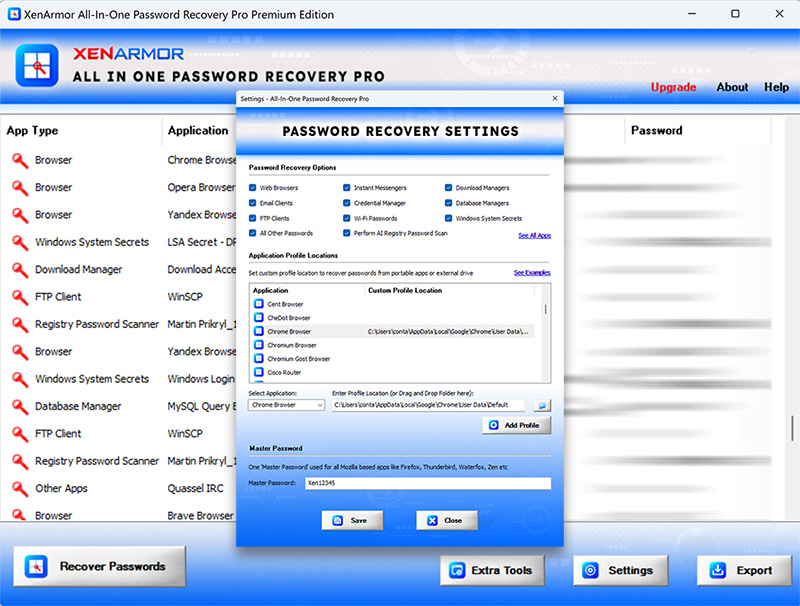 Here are the key features loved by users,
- Recover from 300+ popular Windows apps
- Recover Website, Social Network, Email, Messenger, Database, FTP, Wi-Fi & Windows Vault Passwords
- AI based Registry password scanner
- Extract from all profiles & custom locations
- Support command-line & automation
- Export passwords to PDF, HTML, CSV, JSON & more
👉 Free Download XenArmor All-In-One Password Recovery Pro