How to Recover Saved Passwords in Internet Explorer


In this article, you’ll learn where Internet Explorer stores your passwords, how they are protected, and how you can easily recover them.
Internet Explorer Password Secrets
Latest version of Internet Explorer (v7.0 & higher) saves all the website login passwords in following Registry location,
[IE v7.0 & higher]
HKEY_CURRENT_USER\Software\Microsoft\Internet Explorer\Intelliforms\storage2
Here each Registry value corresponds to each of the website login account stored. Also SHA1 hash of the website link is used as name for this Registry value and data contains encrypted username/password.
IE encrypts the website username & password using Windows DPAPI (Data Protection API) functions.
IE (v7.0 or higher) stores all HTTP Basic authentication (Router/Model login) passwords in Windows Credential Store.
Please refer to next sections for decrypting these passwords programmatically as well as automatically (last section).
Older version of IE (v4.0 to v6.0) used to store all the website passwords in Protected Storage at following Registry location,
[IE v4.0 to 6.0]
HKEY_CURRENT_USER\Software\Microsoft\Protected Storage System Provider
The actual contents of this registry location are encrypted and not visible even in Windows Registry Editor.
Please refer to next section on how to decrypt these passwords programmatically and automatically.
Recover Old IE Version Passwords
IE older version uses Protected Storage to store website login passwords. To recover the passwords, we can use Windows functions like PStoreCreateInstance, EnumItems, ReadItem etc. to go through each of the website logins and recover the username & passwords as shown in sample c++ program below.
#import "pstorec.dll" no_namespace

void ListIEProtectedStorageSecrets()
{
IPStorePtr PStore;
IEnumPStoreTypesPtr EnumPStoreTypes;
GUID TypeGUID;
char strSiteUrl[1024];
char strSiteCredentials[1024];
char szItemGUID[1024];
char strUsername[1024];
char strPassword[1024];

 HRESULT hRes = PStoreCreateInstance(&PStore, 0, 0, 0);

 hRes = PStore->EnumTypes(0, 0, &EnumPStoreTypes);


 while( EnumPStoreTypes->raw_Next(1, &TypeGUID, 0) == S_OK )
 {
   sprintf_s(szItemGUID, 1024, "%x", TypeGUID);

   IEnumPStoreTypesPtr EnumSubTypes;
   hRes = PStore->EnumSubtypes(0, &TypeGUID, 0, &EnumSubTypes);

   GUID subTypeGUID;
   while(EnumSubTypes->raw_Next(1,&subTypeGUID,0) == S_OK)
   {
     IEnumPStoreItemsPtr spEnumItems;
     HRESULT hRes = PStore->EnumItems(0, &TypeGUID, &subTypeGUID, 0, &spEnumItems);

     //Now enumerate through each of the stored entries.....

     LPWSTR strWebsite;
     while( spEnumItems->raw_Next(1, &strWebsite, 0) == S_OK)
     {
        sprintf_s(strSiteUrl, 1024, "%ws", siteName);

        unsigned long psDataLen = 0;
        unsigned char *psData = NULL;
        char *sptr;
        _PST_PROMPTINFO *pstiinfo = NULL;

       //read the credentails for this website entry
       hRes = PStore->ReadItem(0, &TypeGUID, &subTypeGUID, siteName, &psDataLen, &psData, pstiinfo, 0);

       if( lstrlen((char *)psData)<(psDataLen-1) )
       {
         int i=0;
         for(int m=0; m<psDataLen; m+=2)
         {
           if(psData[m]==0)
             strSiteCredentials[i]=',';
           else
             strSiteCredentials[i]=psData[m];
           i++;
         }

         strSiteCredentials[i-1]=0;
       }
       else
       {
          sprintf_s(strSiteCredentials, 1024, "%s", psData);
       }

       //Now decode the username & password from strSiteCredentials for different types

       //5e7e8100 - IE:HTTP basic authentication based passwords
       //username and passwords are seperated by ':'
       if(lstrcmp(szItemGUID, "5e7e8100") ==0 )
       {
         strPassword[0]=0;
         sptr = strstr(strSiteCredentials, ":");

         if( sptr != NULL )
         {
           strcpy_s(strPassword, 1024, sptr+1);
           *sptr = 0;
           strcpy_s(strUsername, 1024, strSiteCredentials);
         }

         printf("\n website = %S, username = %s, password = %s", strSiteUrl, strUsername, strPassword);
       }


       //e161255a - IE autocomplete passwords
       if(lstrcmp(szItemGUID,"e161255a")==0)
       {

         if(strstr(strSiteUrl, "StringIndex" ) == 0 )
         {
           if(strstr(strSiteUrl,":String")!=0)
             *strstr(strSiteUrl,":String")=0;

           lstrcpyn(strPassword,strSiteUrl,8);

           if( !( (strstr(strPassword,"http:/")==0)&&(strstr(strPassword,"https:/")==0) ) )
           {
               //username & passwords are seperated by ','
               strPassword[0]=0;
               sptr = strstr(strSiteCredentials,",");
               if( sptr != NULL )
               {
                  strcpy_s(strPassword, 1024, sptr+1);
                  *sptr = 0;
                  strcpy_s(strUsername, 1024, strSiteCredentials);
               }

               printf("\n website = %s, username = %s, password = %s", strSiteUrl, strUsername, strPassword);

            }
          }

        } //end of autocomplete if

      } //inner while loop

     } //middle while loop

   } //top while loop

} //end of function
Recover New IE Version Passwords
As explained earlier, new version of Internet Explorer (v7.0 & higher) stores all website login passwords in the Registry location. Instead of directly storing website link, it uses SHA1 hash of website link. Also login username & passwords are encrypted using Windows DPAPI function CryptProtectData with Website URL as the salt data.
Here is the sample C++ program to decrypt website password using CryptUnprotectData function,
void RecoverIEPasswords(wchar_t *wstrURL)
{
char strIEStorageKey[]= "Software\\Microsoft\\Internet Explorer\\IntelliForms\\Storage2";
char strUrlHash[1024];
LONG status;
BOOL result;
HKEY hKey;
DWORD DWORD dwSize = 1024;
DWORD BufferLength=5000;
DWORD dwType;
BYTE Buffer[5000];


  //Get the hash for the Website URL
  GetSHA1Hash(wstrURL, strUrlHash, 1024);


  //Now retrieve the encrypted credentials for this website link
  //
  if(ERROR_SUCCESS != RegOpenKeyEx(HKEY_CURRENT_USER, strIEStorageKey, 0, KEY_QUERY_VALUE, &hKey))
    return;

  //Now get the value...
  status = RegQueryValueEx(hKey, strUrlHash, 0, &dwType, Buffer, &BufferLength);

  RegCloseKey(hKey);

  if( status != ERROR_SUCCESS || strlen((char*)Buffer) < 1 )
    return;


  //Now decrypt the website credentials....
  //
  DATA_BLOB DataIn;
  DATA_BLOB DataOut;
  DATA_BLOB OptionalEntropy;

  DataIn.pbData = Buffer;
  DataIn.cbData = BufferLength;

  OptionalEntropy.pbData = (unsigned char*)wstrURL;
  OptionalEntropy.cbData = (wcslen(wstrURL)+1)*2;

  if( CryptUnprotectData(&DataIn, 0, &OptionalEntropy, NULL, NULL, 0, &DataOut) == FALSE )
  {
	printf("CryptUnprotectData failed with error 0x%.8x", GetLastError());
	return;
  }


  //successfully decrypted password

  //
  //Now DataOut.pbData contains username & password in Unicode format
  //


  LocalFree(DataOut.pbData);

}
How to Recover Internet Explorer Passwords Automatically
Now you can easily recover all your forgotten passwords from Internet Explorer without any technical knowledge.
With just one click, XenArmor Browser Password Recovery Pro can recover all your saved Internet Explorer website passwords in seconds.
Follow these simple steps,
- Download & install the software from here
- Click on “Recover Passwords”
- Instantly see all your website passwords from Internet Explorer
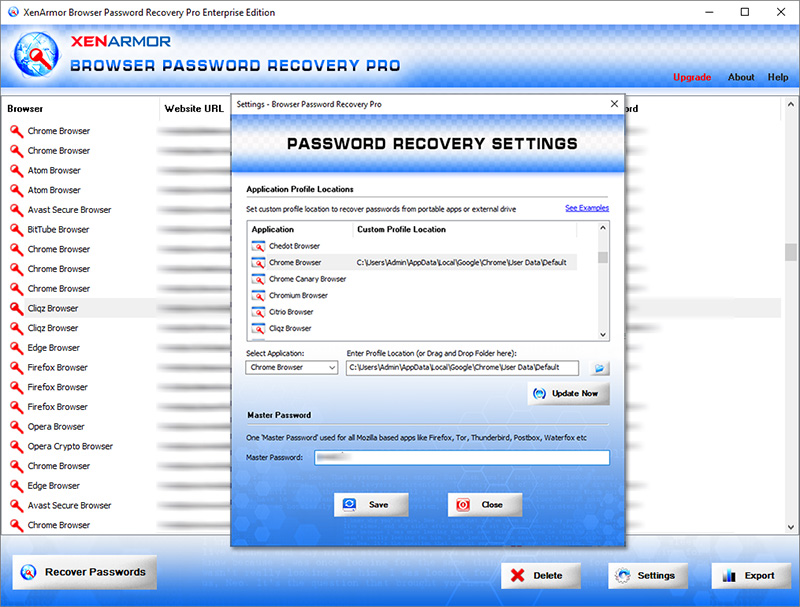
Here are the key features loved by users,
- Works across 140+ web browsers
- Recover all website passwords
- Also recover Form Autofill secrets (key, code, credit card etc)
- Extract from all profiles & custom locations
- Support command-line & automation
- Easily identify with multi-colored display
- Export secrets to PDF, HTML, CSV, JSON & more
👉 Free Download XenArmor Browser Password Recovery Pro
Recommended Posts
How to Switch from PIN to Password Login on Windows
November 29, 2025