




Frequently Asked Questions
From a Global Leader in Password Forensics
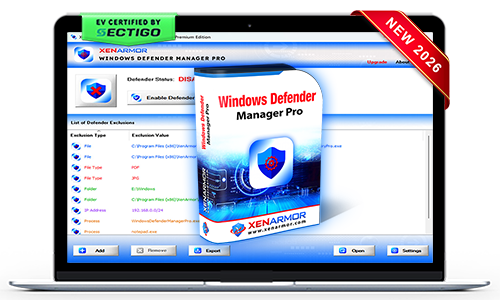
XenArmor Windows Defender Manager Pro
Instantly Disable Windows Defender – Stop File Blocking & Background Scans to Boost Your PC Speed
- One-Click Control: Enable or disable Windows Defender instantly
- Real-Time Monitor: Constantly track and enforce your Defender status
- Defender Guard Protection: Prevent unauthorized Defender status changes
- Advanced Protection Controls: Manage key Defender protections such as Realtime Monitoring, Cloud Protection, Scan Email, Scripts, Downloads & more
- Exclusion Manager: View, add, remove and clean up Defender exclusions
- Command-Line Automation: Control Defender through scripts or scheduler
Trusted by Govt & Enterprises Worldwide

19+Years in Security
285+Security Softwares
180+Countries Served
31+Million Downloads
One Solution for Every Password Recovery Challenge
Forensic Teams
Law Enforcement
Cybercrime Units
Government Agencies
Tired of using multiple password tools with limited recovery?
Recover all credentials from 300+ applications with one unified, professional recovery toolkit.
- Reliable recovery engine backed by decades of security expertise
- One toolkit for website, email, Wi-Fi, FTP, database, messenger, and system passwords
- Industry-leading coverage with support for 300+ popular applications
- Extract passwords from custom profiles, offline data, or external drives
- Portable, forensics-ready workflow for professional recovery operations


IT Technicians
Cybersecurity Teams
System Admins
Struggling to resolve client password recovery cases with outdated tools?
Use one reliable and powerful toolkit to recover all credentials from 300+ applications.
- Stay ahead of evolving password encryption with a regularly updated recovery engine
- Deliver instant recovery results that enhance customer trust and professional reputation
- One powerful toolkit to recover all password types from 300+ Windows applications
- Extract passwords from custom profiles, offline data, or external drives
- Run directly from USB without installation for technician-friendly recovery
Forgot important password?
Instantly recover your lost passwords without resetting accounts or going through lengthy recovery steps.
- One-click password recovery with no technical knowledge required
- Recover website, email, social, database, FTP, Wi-Fi passwords from 300+ applications
- Recover from active profiles, old profiles, offline data, or external drives
- Backup & export recovered passwords to HTML, CSV, XML, JSON, or SQLite formats
- EV certified software - verified for trusted, secure, and tamper-proof software.

Control All Protections of Windows Defender
Realtime Monitoring
Behavior Monitoring
Cloud Protection
PUA Protection
Scan Email
Scan Scripts
Scan Archive
Scan Network Files
Scan Removable Drive
Scan Network Drives
Scan Downloaded Files
Auto Sample Submission
Key Features & Benefits
Control Defender Easily
Turn Windows Defender on or off instantly without navigating through complex Windows settings.
Real-Time Monitor
Continuously monitors Defender status & ensures it stays in your selected protection state.
Prevent Defender Tampering
Stops malware from secretly disabling Defender - safeguarding your PC protection.
Exclusion Manager
Easily add, remove & review Defender exclusions, with right-click context menu support.
All Types of Exclusions
Manage all exclusion types - folders, processes, file extensions & IP addresses.
Remove Malicious Exclusions
Identify and delete malware-added Defender exclusions that can weaken your PC protection.
Command-line & Automation
Run Defender control & exclusion management tasks from the command line or your scripts.
Trusted & Verified Software
EV-Certified by SECTIGO and recognized by leading antivirus solutions.
Portable Unlimited Edition
Run on Unlimited PCs from USB disk without installation or activation
One click to Control & Manage Exclusions of Defender
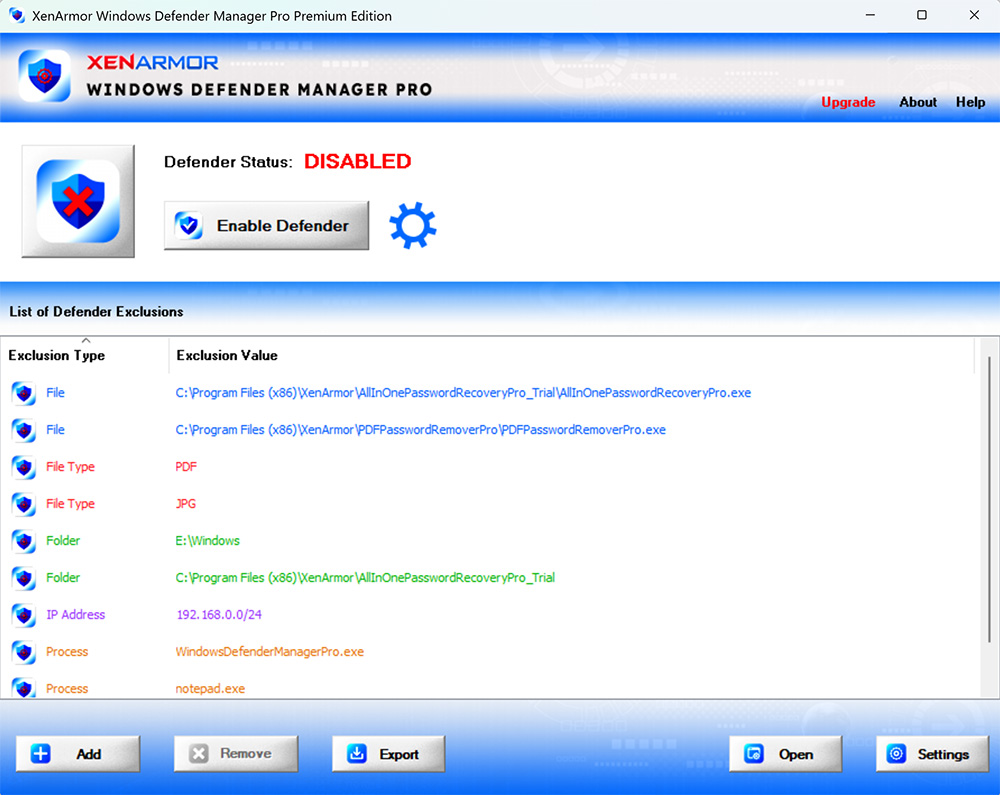
For more screenshots, detailed features, and benefits, please visit the product guide.
Product Guide
SECTIGO "EV Certified" Software
Verified for trusted, secure, and tamper-resistant software deployment.
XenArmor software is signed with an Extended Validation Code Signing Certificate issued after rigorous organization verification by SECTIGO, a globally trusted certificate authority.
- Run with confidence using verified, EV-certified software
- Install software from a trusted and authenticated publisher
- Recognized by Microsoft SmartScreen and leading antivirus engines
- Protected against tampering and unauthorized modifications
- Deploy safely across remote PCs and enterprise environments
Customer Reviews & Industry Recognition









The software provides a simple and reliable way to enable or disable Windows Defender with one click.
- One-Click Control: Instantly turn Defender on or off
- Real-Time Monitor: Keeps your selected status, even if Windows tries to re-enable it
- Run at Startup: Automatically applies your Defender settings on system boot
- Selective Control: Enable/disable specific protections like real-time monitoring, cloud protection, email, scripts, and downloads
- Easy Exclusions: Quickly exclude files, folders, or processes with a right-click
For step-by-step instructions, refer to the User Guide.
It goes beyond basic Windows Settings with advanced control:
- Prevent Defender from auto re-enabling
- Retain settings after reboot
- Automate via command-line
- Exclude files instantly with right-click
Windows Defender runs real-time background scans, which can use system resources and impact performance during intensive tasks.
Temporarily disabling Defender can:
- Reduce CPU and disk usage
- Prevent background scans during high-performance work or gaming
- Improve overall system responsiveness
It is recommended to re-enable Defender after completing your task to maintain system security.
Yes, the software is 100% safe & secure to use
- Digi-signed with EV Certificate by Sectigo - ensuring authenticity & safety.
- Trusted by Antivirus and Windows SmartScreen
No, the software is designed for users of all skill levels.
With one-click, you can disable or enable Windows Defender.
The Trial version is available for both Basic & Premium Edition.
It includes all features of the full version for evaluation with minor limitations,
- Works for 7 days
- Command-line features disabled
We recommend trying the Trial version before purchase. If you need any assistance, contact our support team.
The "Unlimited Edition" trial is not offered for security reasons.You can test the Premium Edition Trial, which has the same features.
The Unlimited Edition adds 100% portability and unlimited PCs support.
Ideal for IT administrators, technicians and security professionals.
Yes, Premium and higher editions include command-line (CLI) support, allowing you to automate enabling/disabling defender or run it from your scripts.
For detailed usage and examples, please refer to the User Guide.
Please contact our support team with all details for expert assistance.
Ready to disable Defender easily & continuously?
Download the Trial version below to see it in action.