How to Recover Download Site Passwords from EagleGet Downloader


In this article, you’ll learn where EagleGet stores all your download site passwords, how they are protected, and how you can easily recover them.
EagleGet Downloader Password Secrets
EagleGet Downloader saves all the download site passwords in file called “data.db” at following location
[Windows Vista/7/8/10]
C:\Users\[user_name]\AppData\Roaming\EagleGet\configs\data.db

[Windows XP/2003]
C:\Documents and Settings\[user_name]\Application Data\EagleGet\configs\data.db
This “data.db” file is stored in SQLite database format. It contains database table called “sites_account” which has fields like site link, user login & password in clear text for each download site.
How to Recover EagleGet Downloader Passwords Automatically
Now you can easily & instantly recover all your lost passwords from EagleGet Download Manager without any technical knowledge.
With just one click, XenArmor Downloader Password Recovery Pro can recover all your saved download site passwords from EagleGet.
Follow these simple steps,
- Download & install the software from here
- Click on “Recover Passwords”
- Instantly see all your saved passwords from EagleGet
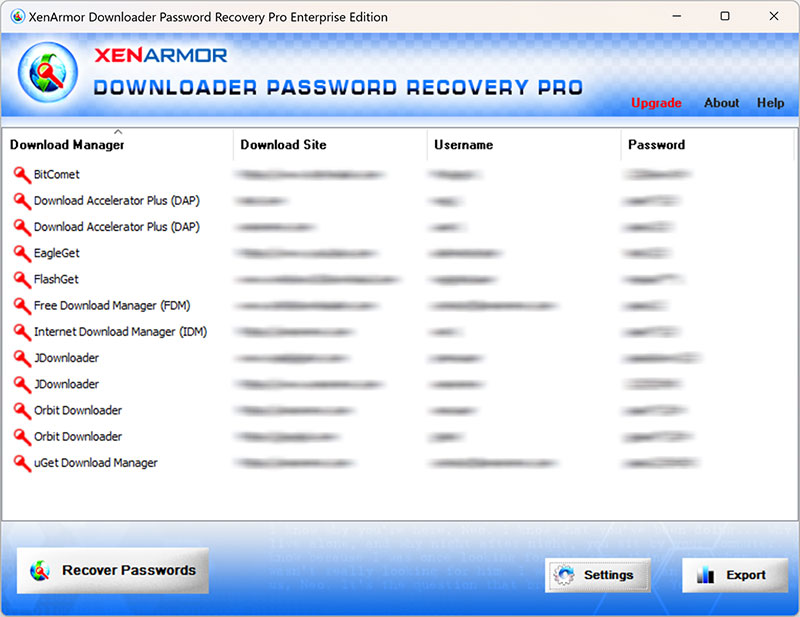
Here are the key features loved by users,
- Recover from 10+ Download Managers
- Recover from both 32-bit & 64-bit apps
- Extract from all profiles & custom locations
- Support command-line & automation
- Export passwords to PDF, HTML, CSV, JSON & more
👉 Free Download XenArmor Downloader Password Recovery Pro
Recommended Posts

How to Switch from PIN to Password Login on Windows
November 29, 2025