

Password Research
How to Recover Remote Desktop Password from TightVNC
In this article, you’ll learn where TightVNC stores your login passwords, how they are protected, and how you can easily recover them.
TightVNC Password Secrets
TightVNC saves your remote desktop login password at following Registry location
HKEY_LOCAL_MACHINE\Software\TightVNC\Server\
Registry Value Name: "Password"

HKEY_CURRENT_USER\Software\TightVNC\Server\
Registry Value Name: "Password"

HKEY_LOCAL_MACHINE\Software\TightVNC\Server\
Registry Value Name: "ControlPassword"

HKEY_CURRENT_USER\Software\TightVNC\Server\
Registry Value Name: "ControlPassword"

HKEY_LOCAL_MACHINE\Software\TightVNC\Server\
Registry Value Name: "PasswordViewOnly"

HKEY_CURRENT_USER\Software\TightVNC\Server\
Registry Value Name: "PasswordViewOnly"
Depending on the version of TightVNC, the above registry location and value names vary but same encryption is used for storing the password.
TightVNC encrypts the above remote desktop password using DES algorithm with 8 byte magic key.
How to Recover TightVNC Passwords Automatically
Now you can easily recover all your forgotten passwords from “TightVNC” without any technical knowledge.
With just one click, XenArmor All-In-One Password Recovery Pro can recover all your saved TightVNC passwords in seconds.
Follow these simple steps,
- Download & install the software from here
- Click on “Recover Passwords”
- Instantly see all your saved TightVNC passwords
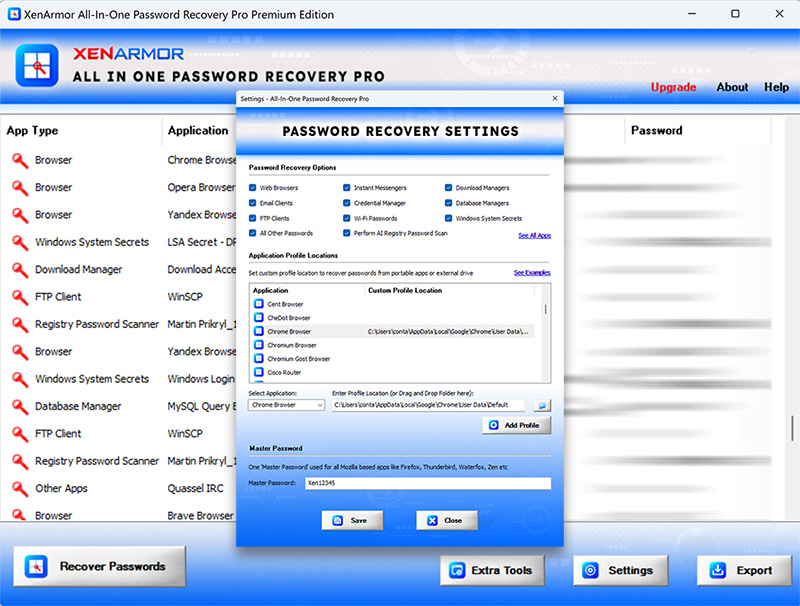
Here are the key features loved by users,
- Recover from 300+ popular Windows apps
- Recover Website, Social Network, Email, Messenger, Database, FTP, Wi-Fi & Windows Vault Passwords
- AI based Registry password scanner
- Extract from all profiles & custom locations
- Support command-line & automation
- Export passwords to PDF, HTML, CSV, JSON & more
👉 Free Download XenArmor All-In-One Password Recovery Pro
Recommended Products
All-In-One Password Recovery Pro
One PRO solution to recover payments, autofill, system secrets &...
Download
All-In-One Key Finder Pro
One PRO solution to recover hardware serials, system keys & lost license...
Download