Password Research
How to Recover Saved Email Passwords in IncrediMail
In this article, you’ll learn where IncrediMail stores your email login passwords, how they are protected, and how you can easily recover them.
IncrediMail Password Secrets
IncrediMail saves all your email login passwords in registry at following location
HKEY_CURRENT_USER\Software\Incredimail\Identities\*\Accounts_New
Under this location, separate registry key is created for each email account. Each such key contains email address and login details for each type (POP3 or SMTP).
For POP3 accounts, server, username & password details are stored in registry values “PopServer”, “PopAccount” and “PopPassword” respectively.
For SMTP accounts, server, username & password details are stored in registry values “SmtpServer”, “SmtpAccount” and “SmtpPassword” respectively.
Both POP3 & SMTP passwords are encoded using proprietary algorithm.
How to Recover IncrediMail Email Passwords Automatically
Now you can easily recover all your forgotten mail login passwords from IncrediMail without any technical knowledge.
With just one click, XenArmor Email Password Recovery Pro can recover all your saved IncrediMail email account passwords in seconds.
Follow these simple steps,
- Download & install the software from here
- Click on “Recover Passwords”
- Instantly see all your saved email passwords
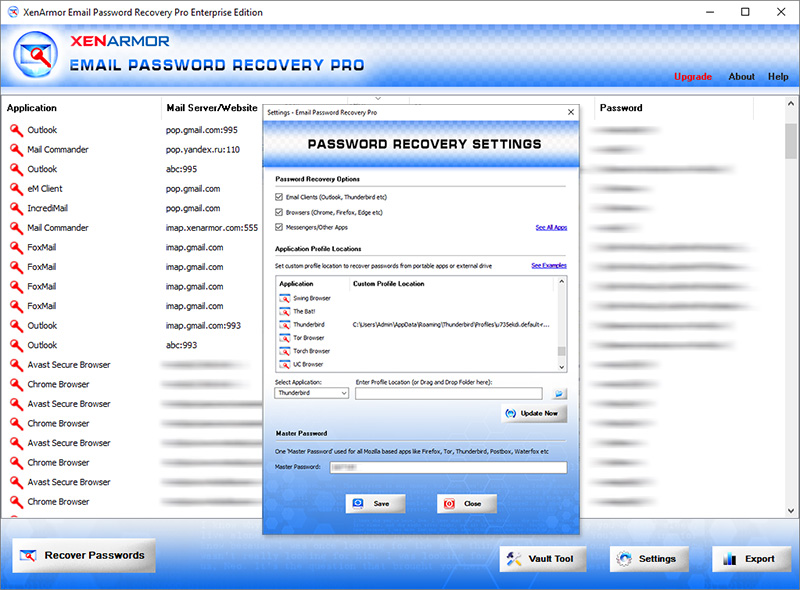
Here are the key features loved by users,
- Recover from 160+ applications
- Support 130+ popular Email services
- Extract from all profiles & custom locations
- Support command-line & automation
- Export passwords to PDF, HTML, CSV, JSON & more
👉 Free Download XenArmor Email Password Recovery Pro
Recommended Products
All-In-One Password Recovery Pro
One PRO solution to recover payments, autofill, system secrets &...
Download
All-In-One Key Finder Pro
One PRO solution to recover hardware serials, system keys & lost license...
Download