Password Secrets of Popular Messengers


Most popular instant messengers such as Trillian, Paltalk, Miranda and others automatically save your login credentials so you don’t have to enter your password every time.
In this research guide, we reveal where these messenger passwords are stored on your system and how you can recover saved login passwords quickly and securely whenever needed.
Password Secrets of Chat Messengers
Below is a comprehensive list of popular instant Messengers, along with their encryption method, storage type and exact password location.
Note: For more technical & password recovery details, please click on Application name
| Messenger | Encryption | Type | Password Location |
|---|---|---|---|
| Beyluxe Messenger | Custom | Registry | HKEY_CURRENT_USER\Software\Beyluxe Messenger\[user_name] |
| BigAnt Messenger | Custom | File (XML) | C:\Users\[user_name]\Documents\Antsys\Globalset.xml |
| Digsby IM | Custom | File | C:\Users\[user_name]\AppData\Local\Digsby\logininfo.yaml |
| Garena Messenger | Custom | File | C:\Users\[user_name]\AppData\Roaming\GarenaPlus\ |
| GG Messenger | AES-256-CBC | File | C:\Users\[user_name]\Appdata\Roaming\GG\Profiles\[email_address]\prefs.js |
| Google Talk | DPAPI | Registry | HKEY_CURRENT_USER\Software\Google\Google Talk\Accounts |
| IMVU Messenger | Plain | Registry | HKEY_CURRENT_USER\Software\IMVU\Password |
| Instantbird | SHA1/3 DES | File (JSON) | C:\Users\[user_name]\AppData\Roaming\Instantbird\Profiles\[random_name]\logins.json |
| Miranda IM | Custom | File (SQLite) | C:\Users\[user_name]\AppData\Roaming\Miranda\[profile_name]\[profile_name].dat |
| Miranda NG | Custom | File | C:\Users\[user_name]\AppData\Roaming\Miranda NG\[workspace]\[workspace].dat |
| MSN Messenger | DPAPI | Registry | HKEY_CURRENT_USER\Software\Microsoft\Identitycrl\Creds |
| Myspace IM | DPAPI | File | C:\Users\[user_name]\AppData\Roaming\MySpace\IM\users.txt |
| Nimbuzz Messenger | SHA1/DES | Registry | HKEY_CURRENT_USER\Software\Nimbuzz\Pcclient\Application |
| Paltalk | Custom | Registry | HKEY_CURRENT_USER\Software\Paltalk\[account] |
| Paltalk NG | Custom | Registry | HKEY_CURRENT_USER\Software\A.V.M.\Paltalk Ng\Common_Settings\Core\Users\Creds\1 |
| Pidgin Messenger | Plain | File (XML) | C:\Users\[user_name]\AppData\Roaming\.purple\accounts.xml |
| Skype | MD5/AES-256 | File | C:\Users\[user_name]\Appdata\Roaming\Skype\[account]\config.xml |
| Spark IM | MD5/3 DES | File | C:\Users\[user_name]\AppData\Roaming\Spark\spark.properties |
| TeamSpeak | Custom | File | C:\Users\[user_name]\Appdata\Roaming\Ts3client\ts3clientui_qt.secrets.conf |
| Trillian | DPAPI/XOR | File | C:\Users\[user_name]\AppData\Roaming\Trillian\users\global\accounts.dat accounts.ini |
| Windows Live Messenger | Plain | File | Windows Credential Manager |
| XFire | Custom | File | C:\Users\[user_name]\.xdman\ |
| Yahoo! Messenger | Custom | Registry | HKEY_CURRENT_USER\Software\Yahoo\Pager |
How to Recover Passwords from Messengers Automatically
If you ever forget your password, now you can easily & instantly recover all your lost passwords from popular chat Messengers without any technical knowledge.
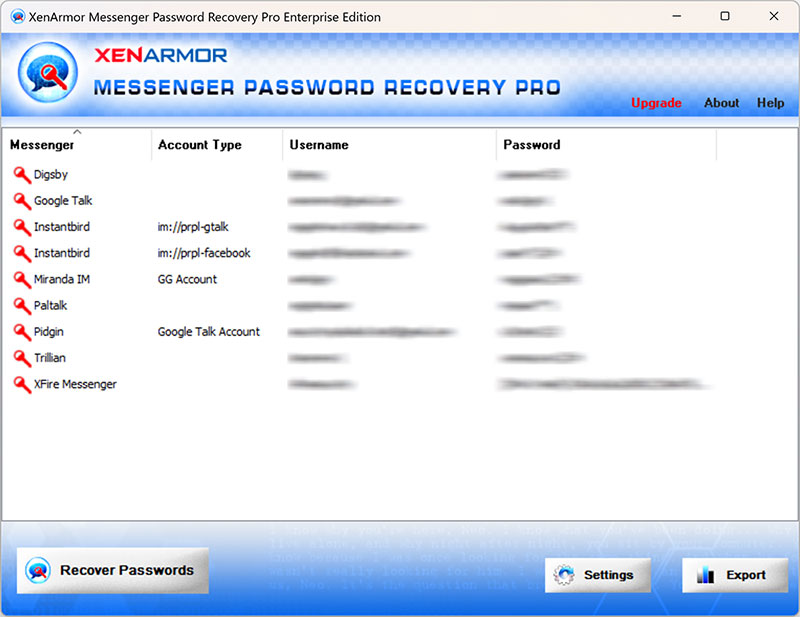
With just one click, XenArmor Messenger Password Recovery Pro can recover all your saved login passwords in seconds.
Follow these simple steps,
- Download & install the software from here
- Click on “Recover Passwords”
- Instantly see all your saved messenger passwords
Here are the key features loved by users,
- Recover from 15+ instant messengers
- Recover from both 32-bit & 64-bit apps
- Extract from all profiles & custom locations
- Support command-line & automation
- Export passwords to PDF, HTML, CSV, JSON & more
👉 Free Download XenArmor Messenger Password Recovery Pro
Recommended Posts
How to Switch from PIN to Password Login on Windows
November 29, 2025